
1) Why “photos are too large” happens
Email providers often reject or silently drop messages with big attachments. The limit varies by service, but a common ceiling is 10–25 MB total per email. Modern phones routinely create 3–12 MB photos each—so just a handful of images can exceed the cap.
Instead of fighting your inbox, treat the photos like a small “case file”: keep them organized, keep filenames clear, and share them via a method designed for large media (cloud link) when needed.
2) The photo set that answers most appraisal questions
Appraisers aren’t just looking for beauty shots—they need evidence. A good default set for almost any object is:
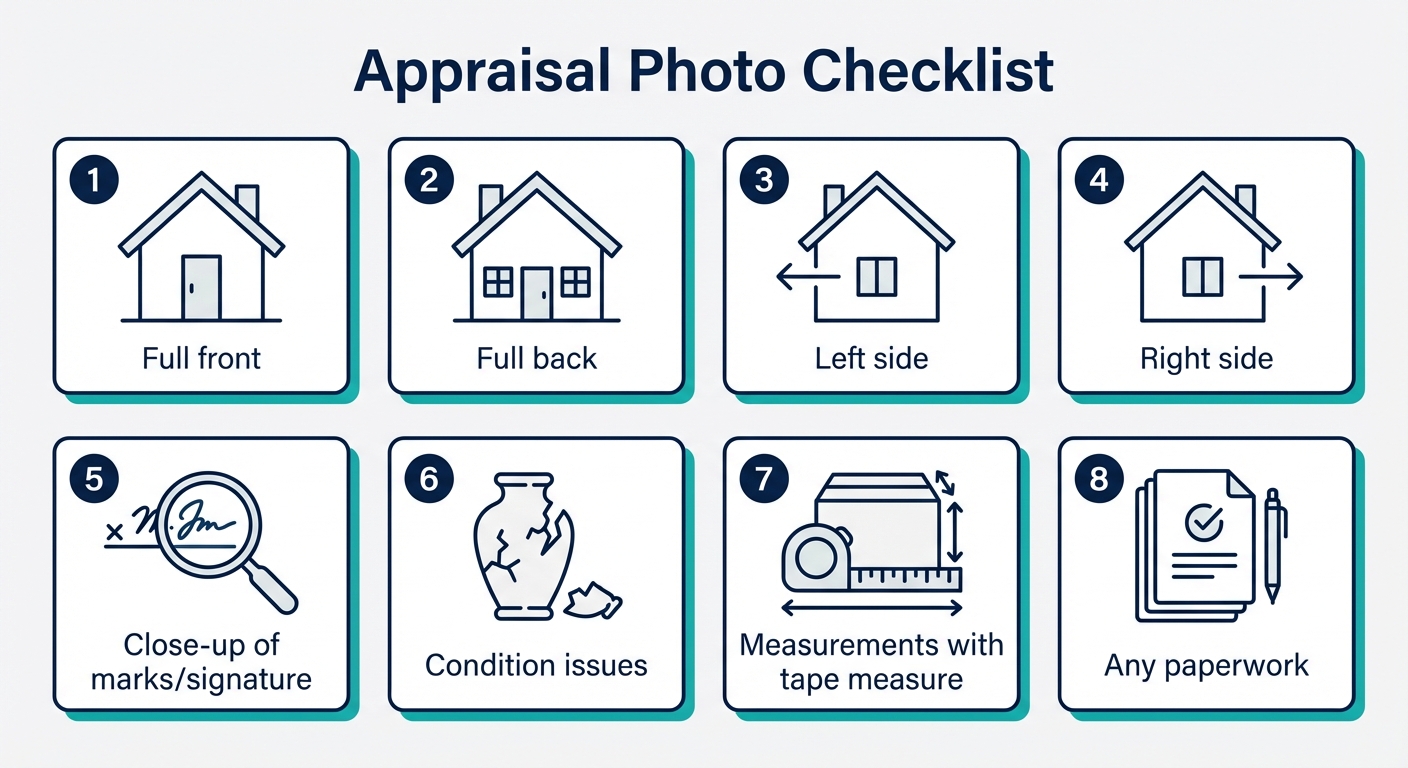
- Full front + full back: includes overall form, handles, feet, and construction.
- Both sides: reveals profile, thickness, and repairs.
- Close-ups of marks: signatures, hallmarks, stamps, labels, foundry marks, patent dates, etc.
- Condition evidence: chips, cracks, restorations, missing parts, tarnish, repainting, relining.
- Measurements: a photo with a tape measure or ruler in frame plus written dimensions.
- Paperwork: receipts, prior appraisals, gallery labels, auction tags, provenance notes.
If you can only send three photos: choose full front, full back, and the best mark/signature close-up.
3) How to take clearer, more “usable” appraisal photos
- Use soft daylight: photograph near a window with indirect light; avoid direct sun and harsh flash.
- Choose a plain background: white, gray, or black cloth reduces distraction and improves edge detection.
- Hold the camera steady: brace elbows on a table, or use a stack of books as a stand.
- Tap to focus: on marks/signatures, tap the screen on the mark itself before shooting.
- Take multiples: marks are often the hardest part—shoot 5–10 variations and keep the sharpest.
Pro tip: for reflective surfaces (silver, glossy ceramics, varnished paintings), move the light source—not the object—until glare disappears.
4) Measurements: what matters (and what to include)
Measurements let an appraiser match your object to the correct comparables and estimate shipping/handling risk. Include:
- Height × width × depth (or diameter for round items).
- Weight if you have a scale (especially jewelry, silver, and small objects).
- Imageable scale shot: one photo with a tape measure or ruler in the frame.
If it’s framed art, provide both unframed (if known) and framed dimensions. For furniture, include key spans (overall height, seat height, tabletop depth, etc.).
Want a first read on the photo set?
Upload the photos, measurements, and mark close-ups you have. Appraisily can confirm whether the file is complete enough for a written appraisal.
5) Quick ways to resize or compress photos (without ruining detail)
For email, aim for roughly 1200–2000 px on the long edge and under ~2 MB per image when possible. That’s usually enough resolution for identification while keeping attachments manageable.
- iPhone: in Mail, when you attach photos, choose “Small/Medium/Large/Actual Size.” Pick Medium or Large.
- Android: in Gmail, use “Attach file” and choose the lower-resolution option if prompted; or share via Google Photos link.
- Mac: use Preview → Tools → Adjust Size, then export.
- Windows: Photos app → Save as copy (often reduces size) or use a reputable resize tool.
If you’re comfortable with command line, ImageMagick is excellent for batch resizing:
magick input.jpg -resize 2400x2400\> -quality 85 output.jpg
6) The safest way to send lots of photos: share a folder link
When you have 10–30 images (common for collections or complex objects), a folder link is usually best:
- Upload photos to Google Drive, Dropbox, iCloud Drive, or OneDrive.
- Create a “view” link (no edit permissions).
- Paste the link in your message and include the item summary + measurements.
Tip: name the folder with your item and date (for example, “Grandfather clock — Dec 2025”) so it stays searchable later.
7) What to write in your message (copy/paste template)
Short, structured notes beat long stories. Copy/paste and fill in:
ITEM: (what it is in plain language) DIMENSIONS: (H × W × D, weight if known) MARKS: (signature, stamp, label, any dates) CONDITION: (chips, cracks, repairs, missing parts) GOAL: (sell / insure / donate / learn value) PHOTOS: (attached or link) LOCATION: (city/country)
This format lets an appraiser respond faster and reduces the chance you’ll be asked for the same basics again.
8) Privacy and permissions (what to avoid)
- Don’t send sensitive IDs (passports, driver’s license numbers) unless explicitly required.
- Avoid watermarking marks (signatures/hallmarks) heavily—watermarks can obscure the evidence needed for attribution review.
- Don’t over-edit: heavy filters can distort color and surface texture, which matters for paintings and ceramics.
Continue your valuation journey
Ready to upload your photos?
If email attachments keep failing, use a secure upload instead. Add photos and measurements once, and we’ll match the file with the right specialist.
Fast online valuation
Start an online appraisal
Upload photos, measurements, and any marks. We reply with a written value and selling suggestions.
How We Research Valuation Data
Our appraisal guides are based on auction results, dealer pricing data, and professional appraiser insights. We may earn a commission when you use our free professional appraisal service. Learn about our editorial standards.
Find local experts
Browse the Art Appraisers Directory
Connect with appraisers who offer remote consultations worldwide.